Artificial Intelligence has moved from being a technology discussed mainly by programmers to becoming a practical skill for students, professionals, business owners, creators and freelancers.
Today, you can use AI to write content, create images, analyze information, automate repetitive work, build marketing campaigns and support business decisions. You do not necessarily need to become a programmer to start using AI effectively. Google’s beginner-focused AI learning resources also emphasize that many AI tools can be used without coding experience.
But there is one common problem: Where should a complete beginner start?
This Complete AI Beginner Roadmap provides a simple step-by-step path so you can learn AI without feeling confused by hundreds of tools and technical terms.
Why Should Beginners Learn AI?
AI is becoming an important workplace skill. The World Economic Forum’s Future of Jobs Report 2025 identifies AI and big data among the fastest-growing skills, while technological literacy, analytical thinking, creative thinking and lifelong learning are also becoming increasingly important.
The important point is that learning AI does not mean simply learning one chatbot.
The real skill is knowing how to use AI to solve real problems.
For example:
- A student can use AI for research and study planning.
- A marketer can use AI for content ideas and campaign planning.
- A business owner can automate repetitive customer tasks.
- A YouTube creator can use AI for scripting and content planning.
- A freelancer can combine AI with design, writing, video editing or marketing skills.
Matlab, AI ko tool ki tarah use karna seekhiye—not just technology ke naam ya features yaad kijiye.
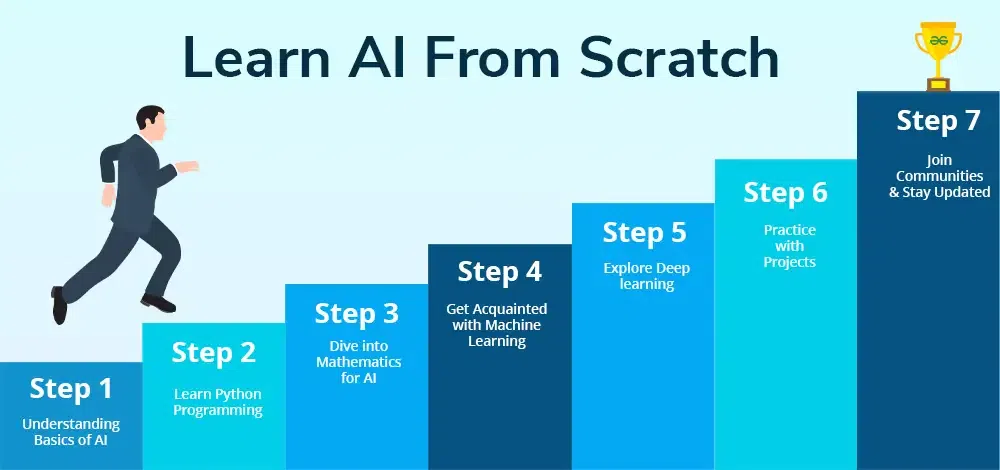
Step 1: Understand the Basics of AI
Before using advanced AI tools, understand the basic concepts.
Start with:
- What is Artificial Intelligence?
- What is Machine Learning?
- What is Generative AI?
- What are Large Language Models?
- What are AI agents?
- What is automation?
- What are prompts?
- What are AI limitations and risks?
You don’t need mathematical formulas at this stage.
Your goal should be to understand what AI can do, what it cannot do, and where it can be useful.
For example, Generative AI can create or transform content such as text, images and other media from instructions given in natural language.
Step 2: Start Using AI Tools
Once you understand the basics, start practicing with different types of AI tools.
Instead of trying 50 tools in one week, choose a few categories:
| Skill Area | What You Can Practice |
|---|---|
| AI Chat Tools | Research, brainstorming, writing |
| Image AI | Posters, concepts, social media visuals |
| Video AI | Short videos, editing assistance |
| Audio AI | Voice, music and audio content |
| Productivity AI | Summaries, documents, ideas |
| Marketing AI | Content plans, ads and campaigns |
| Automation AI | Repetitive business workflows |
Don’t focus only on “Which is the best AI tool?”
Ask instead:
“Which tool can solve my particular problem?”
That mindset will save you time and money.
Step 3: Learn Prompting
Prompting is one of the most useful beginner AI skills.
A prompt is simply the instruction you give an AI system.
A weak prompt might be:
“Write a marketing post.”
A better prompt could be:
“Act as a digital marketing expert. Create a short Facebook post for a local jewellery store targeting women aged 25–45. Use simple English, highlight the store’s USP and end with a WhatsApp enquiry CTA.”
The second instruction gives the AI more useful context.
Learn to include:
- Role
- Task
- Context
- Target audience
- Format
- Tone
- Restrictions
- Desired result
Google’s AI Essentials curriculum also includes prompt engineering and responsible AI as core beginner skills.
Step 4: Connect AI With Your Existing Skill
This is where AI becomes much more valuable.
Suppose you already know digital marketing.
Don’t try to become an AI researcher.
Instead, learn AI + Digital Marketing.
If you are a designer, explore AI + Design.
If you are a video editor, explore AI + Video.
If you are a business owner, explore AI + Business Automation.
This combination can create a much more practical career direction.
| Existing Skill | AI Combination |
|---|---|
| Digital Marketing | AI Marketing |
| Writing | AI Content Creation |
| Graphic Design | AI Design |
| Video Editing | AI Video Creation |
| Sales | AI Sales Automation |
| Website Development | AI Website Workflows |
| Teaching | AI Education Tools |
| Business | AI Business Automation |
The future is increasingly about combining AI literacy with domain knowledge rather than treating AI as an isolated skill.
Step 5: Build Small Practical Projects
Watching tutorials is not enough.
Learn → Practice → Build → Improve.
Start with simple projects.
For example:
Project 1: Create a 7-day social media content calendar using AI.
Project 2: Create a simple business promotional poster.
Project 3: Build an FAQ chatbot concept for a business.
Project 4: Create a YouTube video script and thumbnail concept.
Project 5: Automate a repetitive business workflow.
These projects become proof that you can actually use AI.
For example, instead of telling a potential client:
“I know AI.”
You can say:
“I created an AI-assisted content workflow that generates a weekly content plan, captions and creative ideas for a small business.”
That is much stronger.
Step 6: Learn Responsible AI
AI can produce incorrect information, biased outputs or misleading content.
Therefore, don’t blindly copy everything AI generates.
Always:
- Verify important facts.
- Review AI-generated content.
- Protect confidential information.
- Check sources where necessary.
- Avoid misleading claims.
- Keep human judgment in important decisions.
Responsible AI should be part of your learning roadmap from the beginning—not something you learn later.
Step 7: Create Your AI Portfolio
After completing a few projects, create a simple portfolio.
Your portfolio can include:
- AI content samples
- Before-and-after examples
- AI marketing campaigns
- Automation workflows
- AI-generated creative work
- Website projects
- Case studies
- Short videos demonstrating your process
A portfolio is especially useful for freelancers and job seekers because it demonstrates practical ability.
A Simple 90-Day AI Beginner Roadmap
| Time | Learning Goal |
|---|---|
| Days 1–15 | AI fundamentals and terminology |
| Days 16–30 | AI tools and prompting |
| Days 31–45 | AI + your existing skill |
| Days 46–60 | Practical AI projects |
| Days 61–75 | Automation and advanced workflows |
| Days 76–90 | Portfolio, personal branding and real-world practice |
Don’t worry about becoming an AI expert in 90 days.
The goal is to develop a strong foundation and practical confidence.
Common Mistakes Beginners Should Avoid
Many beginners make the same mistakes:
- Trying too many AI tools at once
- Watching tutorials without practicing
- Copying prompts without understanding them
- Believing every AI-generated answer
- Focusing only on certificates
- Ignoring their existing professional skills
- Expecting instant income from AI
- Not building real projects
The better approach is simple:
Learn one concept → practice it → create something → review the result → improve.
Frequently Asked Questions
Is AI difficult for beginners?
Not necessarily. Many modern AI tools are designed to work with natural-language instructions, so beginners can start without programming knowledge.
Do I need coding to learn AI?
No. If your goal is to use AI tools for content, marketing, productivity or automation, you can start without coding. Coding becomes more important for technical AI development and machine learning roles.
What should I learn first in AI?
Start with AI fundamentals, Generative AI, prompting, practical AI tools and responsible AI use.
How long does it take to learn AI?
There is no fixed timeline. You can learn basic AI tool usage relatively quickly, but becoming highly skilled requires continuous practice and real projects.
Which AI skills should beginners learn?
Prompting, AI tool usage, content creation, research, automation basics, critical thinking and AI-assisted workflows are good starting points.
Can students learn AI?
Yes. Students can use AI to support learning, research, presentations, creative projects and skill development while maintaining their own judgment and originality.
Can AI help with freelancing?
Yes, AI can support services such as content creation, digital marketing, design, video workflows, research and automation. However, income is not guaranteed; success depends on skills, quality, portfolio, client demand and consistent work.
What is the best way to learn AI?
The most effective approach for beginners is a combination of structured learning and hands-on practice. Don’t just watch tutorials—build small projects and apply AI to real problems.
Conclusion
Learning AI does not have to be confusing.
You don’t need to learn every new AI tool that appears online. Start with the fundamentals, learn effective prompting, practice useful tools, combine AI with your existing skills and build real projects.
The biggest advantage will not come from simply saying “I know AI.”
It will come from being able to say:
“I know how to use AI to solve real problems.”
As AI continues to influence workplaces and businesses, continuous learning will become increasingly important. The World Economic Forum also highlights the growing importance of technological skills alongside creative thinking, resilience and lifelong learning.
If you want structured, practical guidance instead of learning randomly from hundreds of online videos, DigiAI Technologies can help you build the right foundation.
Explore DigiAI Technologies’ AI Courses and Learning Programs to learn practical AI tools, AI content creation, prompting and business applications.
You can also explore:
- AI Courses – Build practical AI skills from beginner level.
- Digital Marketing Training – Learn SEO, social media, online advertising and modern marketing.
- Website Development Services – Build professional websites for businesses and personal brands.
- Business Automation Solutions – Identify repetitive tasks and create smarter digital workflows.
- AI Learning Programs – Learn how AI can be applied to career growth, content and business.
Start with one skill. Practice it. Build something useful. Then keep improving.
That is the real AI beginner roadmap.